Design Portfolio

School-enterprise cooperation booth backdrop: compressing an entire cooperation proposal into a single board

A single booth backboard has to serve three kinds of people at once: those who glance in passing, those who stop and look for two minutes, and those who sit down to negotiate terms. This project's approach is to divide the space by reading distance: self-introduction on the left, methodology in the middle, and cooperation terms spelled out clearly on the right.

陕西研学 Qingdao Launched 2026-10-25
School-enterprise cooperation booth backdrop: compressing an entire cooperation proposal into a single board
Client陕西研学
Industry & TraitsDesign PortfolioEducation
RegionQingdao
Launched2026-10-25
Delivery TeamXiXi

The first step in exhibition stand design is not to set the style but to set the reading distance.

Foot traffic at an exhibition is not uniform. Some people walk past along the main aisle and give you only three seconds; some slow down, stop, and look for two minutes; some actually sit down, take out a notebook, and start talking.

A booth backdrop has to serve all three groups at the same time. So the first step in booth design is not deciding on a style—it is deciding the reading distance.

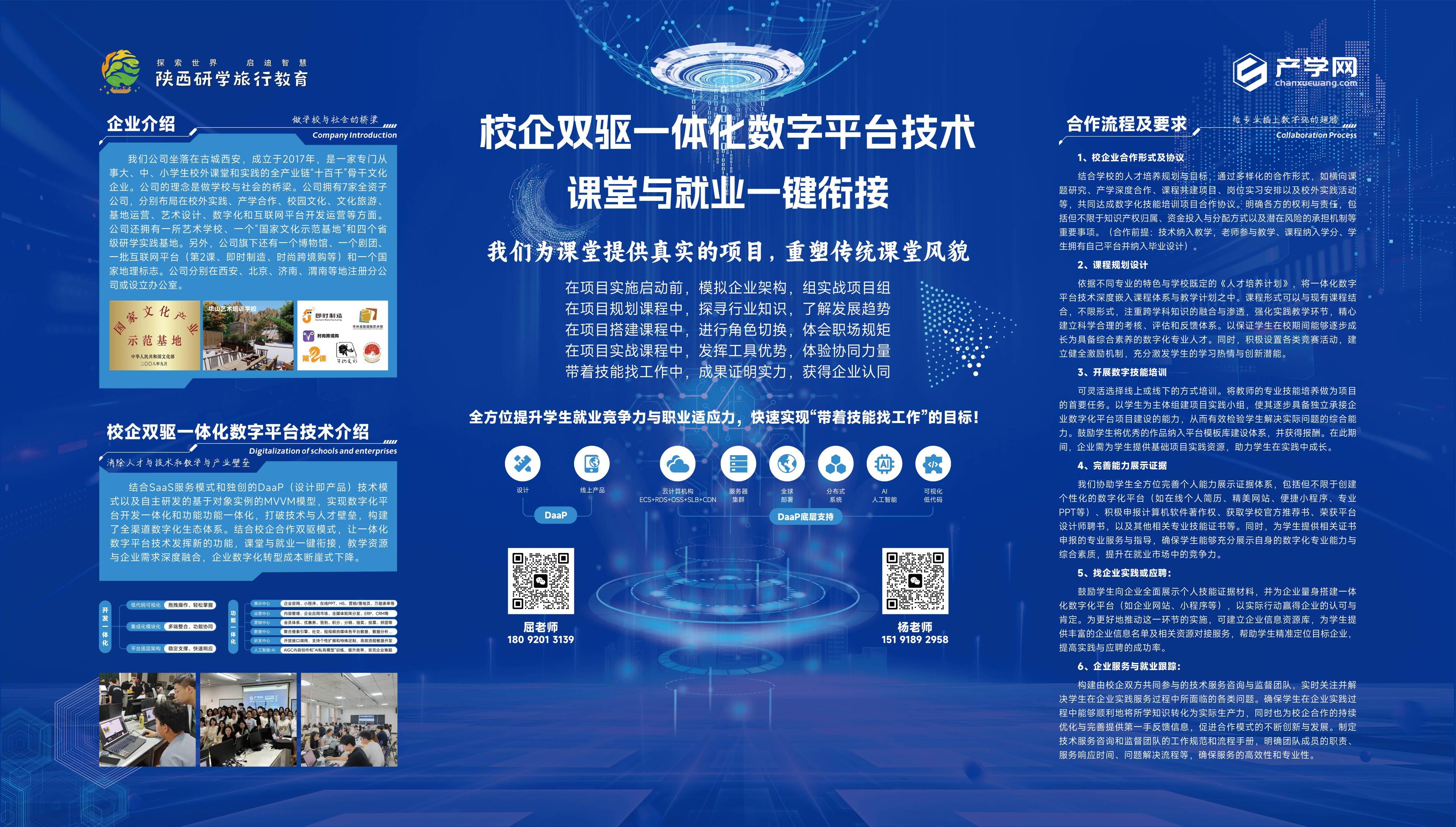
This project uses three vertical columns: the left column introduces us, the middle column explains our approach, and the right column states cooperation terms. When people step back, they see the whole picture and professionalism; when they step forward, they read the process in the middle column; when they sit down, the right column serves as the opening remarks.
School-enterprise cooperation exhibition booth backdrop design

Main title: Every technical term must be followed by a plain-language sentence.

The main title is “School-Enterprise Dual-Drive Integrated Digital Platform Technology,” followed immediately by a line in a smaller font: “One-Click Connection Between Classroom and Employment.”

This is a rare but very correct two-tier approach.

The first sentence is for insiders—school leaders, academic affairs staff, and program directors. They understand terms like “dual-drive” and “integrated platform,” and this line determines whether they will stop and take notice. The second sentence is for everyone—whether or not they understand technology, they can immediately know what you can solve.

Below that, add one more line that states the real value proposition: provide real projects for the classroom and reshape the traditional classroom experience.

The most common mistake at a booth is writing only the second sentence. It sounds beautiful, but insiders will find you empty; writing only the first sentence does not work either—outsiders will simply walk past.

The left column addresses who I am: write credentials, not history.

The left column contains two sections, "Company Introduction" and "Platform Technology Introduction," plus three on-site photos.

When institutional clients look at an exhibition booth, their first action is not to read a story but to verify: who you are, what you have done, and whether you have actually delivered.

So this column does not spend space on "vision and mission." The company profile clearly states three facts: when it was founded, which segment of education it serves (off-campus study tours and labor education), and how many operating centers it currently has. The next section goes straight to technology: the SaaS service model and DaaS data service, with a row of capability tags below.

That row of small tags works well at an exhibition booth. They do not need to be read in full; their purpose is to let people see the breadth of your capabilities at a glance.

The five-step process in the middle is the centerpiece of the entire board.

The middle row is the core of the entire board: Project Kickoff → Project Planning → Project Setup → Tool Advantages → Land a Job with Skills.

Five nodes, each consisting of an icon + a very short line of description, arranged horizontally from left to right.

Why a process instead of a four-box grid? Because when institutional clients stand in front of the booth, they have only one question in mind: How does this get implemented? Implementation means there is an order, stages, and an endpoint. A horizontal process directly answers the order.

The wording of the last step is "Land a Job with Skills," not "Improve the Employment Rate." The former is a scenario a student can imagine, while the latter is a metric for reporting. At the booth, choose the former.

Beneath the entire process, add one summary sentence: comprehensively enhance students' employment competitiveness and career adaptability. At this point, the proposition and the path form a closed loop.

Putting the contract clauses on the wall in the right column is unconventional but correct.

The right column is "Cooperation Process and Requirements," with six numbered items, ranging from school-enterprise cooperation forms and agreements all the way to curriculum development, teaching practice, needs and competency assessment, employment practice empowerment, and enterprise services and employment tracking.

Putting contract terms on a display board—many people would think it wastes space. Aren't these things you discuss only when you sit down?

Quite the opposite. At an exhibition, the same explanation has to be given thirty times a day, and every time it starts with "We offer two forms of cooperation." Once it's written on the wall, that repetition can be skipped, and you can jump straight to their questions.

More importantly, it's a filter: mismatched institutions can tell at a glance that it's not a fit, saving both sides half an hour; serious institutions will compare it themselves, take a photo with their phone, and report back.

The booth is not a billboard; it is a negotiation tool. Any information that can move the conversation forward onto the wall should go on the wall.

Two QR codes are meant to divert traffic, not to pile up.

Below are two QR codes side by side, for two different contacts.

The most common approach at a booth is to put up just one QR code: everyone scans the same one, all the questions flood toward a single person, they can't keep up with replies, and the leads go cold.

Two entry points mean triage: different roles, different regions, different types of questions, each reaching the right person. For a team that has to receive visitors throughout an entire exhibition, this is far more practical than adding one more slogan.

Deep blue with circuit textures is industry language; the nuance lies in contrast.

The background is deep blue, with circuit textures and light effects. This choice isn’t about “looking techy and attractive” — it’s industry language: if what you do is a digital platform, your booth can’t look like a student recruitment poster.

But the real difficulty on a deep blue background is contrast. Exhibition hall lighting is mixed, crowds are dense, and viewing distances are long, so large dark areas easily blur into one mass. That’s why body text is pure white, headings are enlarged and bolded, and the highlight color is reserved only for the single most critical line.

High information density doesn’t mean clutter. All three columns have their own main color blocks, line spacing is consistent, and there are only three levels: proposition, heading, and description. Even if the text is small, the eye still knows where to look first.

From screen to large-format printing, there is one print in between.

No matter how good a design looks on screen, it ultimately has to be produced by large-format printing. This is the step where problems are most likely to arise.

The first is size and resolution. This panel is output at 3840 pixels wide, and it remains clear when enlarged to the actual booth size; if it is made at 1920 as is customary for screens, the edges of the printed text will look fuzzy.

The second is color. Screens use RGB, while large-format printing uses CMYK. Dark blue is the most prone to color shift—it may turn purple or green. Before delivery, you must convert the color space and proof it once; you cannot take an RGB file directly to print.

The third is small text. Size-8 type on a display panel may be legible on screen, but when printed on a two-meter-high panel it may blur. Therefore, body text should be sparse rather than dense; for content that really must be included, use line spacing and color blocks to separate it, not smaller font sizes.

The final step in booth design is not in the design software, but at the print shop.